:%20an%20arch%20with%20a%20rounded%20play%20triangle%20cut%20out.%20--%3e%3cdefs%3e%3cmask%20id='pd-mark-cut'%20maskUnits='userSpaceOnUse'%20x='138'%20y='119'%20width='234'%20height='264'%3e%3crect%20x='138'%20y='119'%20width='234'%20height='264'%20fill='%23fff'/%3e%3cpath%20d='M230%20212%20L230%20304%20L309%20258%20Z'%20fill='%23000'%20stroke='%23000'%20stroke-width='16'%20stroke-linejoin='round'/%3e%3c/mask%3e%3c/defs%3e%3cpath%20mask='url(%23pd-mark-cut)'%20fill='%23f0863a'%20d='M138%20236%20A117%20117%200%200%201%20372%20236%20V365%20Q372%20383%20354%20383%20H156%20Q138%20383%20138%20365%20Z'/%3e%3c/svg%3e) Playden
PlaydenPlayden for PS5 · Alpha
Play your Steam games on a jailbroken PS5
Playden is a free, open-source app for your console. It signs in to Steam, downloads the Windows games you own and adds each one to your Home screen.
It's early software. Read the risks before you install it. Questions? Ask on Discord.
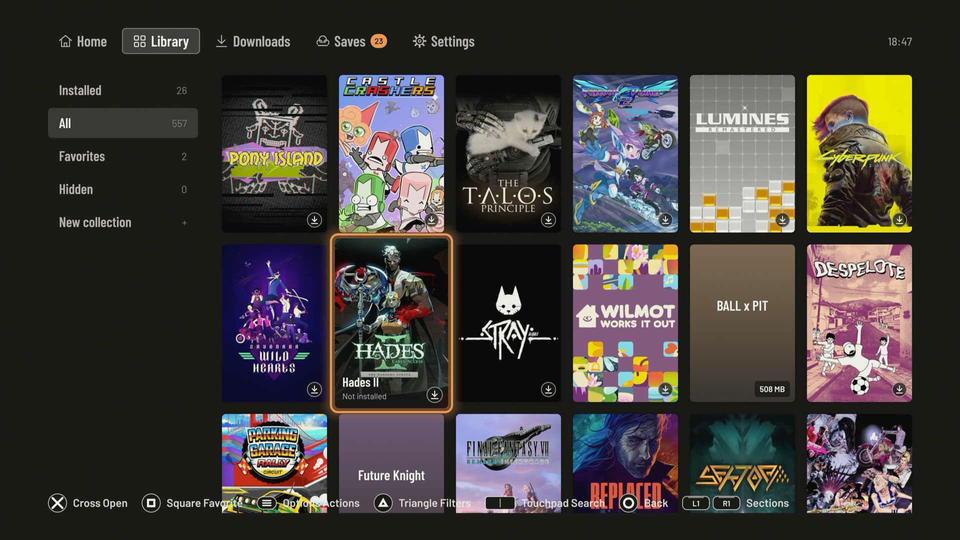
What it does
Find a game, download it and play
Sign in with your phone
Scan a QR code and approve it in the Steam mobile app. You can also use your account name and password.
Your whole Steam library
Search, sort, favorites and collections, with cover art. The Library also works offline.
A tile for every game
Each game gets its own tile on the Home screen, so you can start it without opening Playden.
Steam Cloud saves
Playden syncs your saves before and after you play. If the console and the Cloud disagree, you choose which to keep.
Settings for each game
Graphics, frame rate, resolution and controller mapping. Each game has its own Windows setup, so settings don't mix.
Controller, mouse or keyboard
Games see the DualSense as an Xbox controller. You can also plug in a USB mouse and keyboard.
Import your own games
Add Windows games you already have from a USB drive, an M.2 SSD or over FTP. You don't need a Steam account.
Install to a USB drive
Keep your games on console storage or on an exFAT USB drive formatted on a Mac or PC.
Not every game works yet. See the compatibility list for the games we've tested.